Introduction
In today’s digital landscape, it’s easy to get caught in endless scrolling, notifications, and distractions that can harm our productivity and wellbeing. Clarity Pro is an innovative browser extension that aims to address this challenge by constructively disrupting harmful digital patterns. Built on principles of behavioral psychology, Clarity Pro offers gentle awareness-building rather than aggressive blocking.
This case study will dive into the technical architecture and implementation details of Clarity Pro, providing practical insights for developers looking to build similar mindful tools. We’ll cover the core components, design patterns, and best practices used to create this impactful extension.
System Architecture
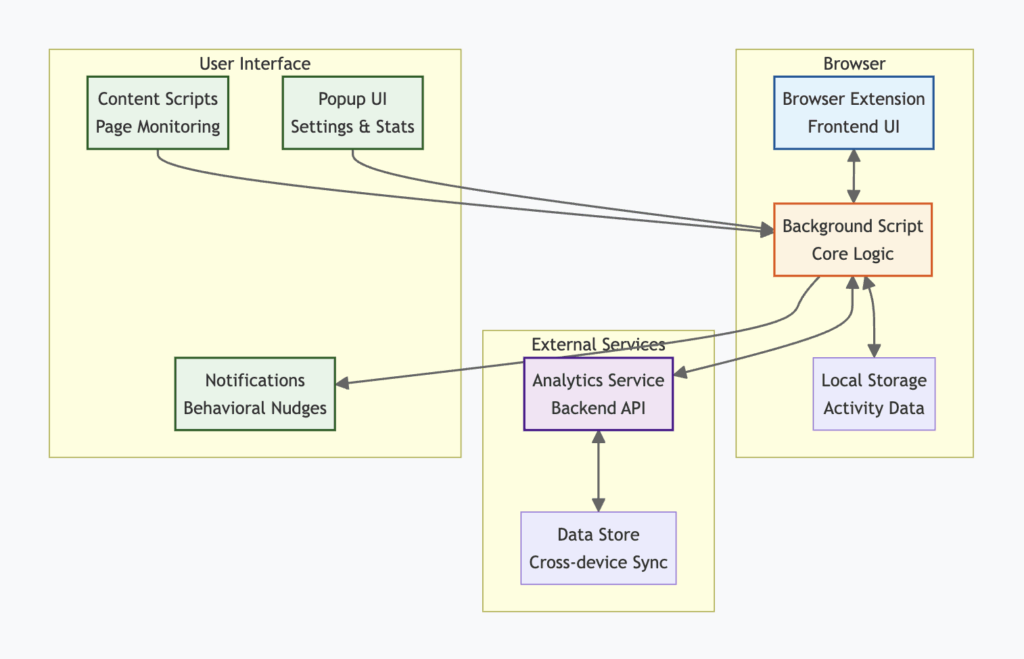
The Clarity Pro system consists of three main components:
- Browser Extension: The frontend UI and event handlers that interact directly with the user’s browsing experience.
- Background Script: Handles the core logic, storage, and communication between the extension and external services.
- Analytics Service: A backend API for aggregating usage data and generating insights.
These components communicate through a combination of Chrome Extension APIs, REST endpoints, and secure WebSocket connections.
Implementation Details
Tracking User Activity
At the heart of Clarity Pro is its ability to monitor user activity and identify potential digital wellbeing issues. This is accomplished through a combination of Chrome Extension APIs:
// Track active tab
chrome.tabs.onActivated.addListener((activeInfo) => {
  chrome.tabs.get(activeInfo.tabId, (tab) => {
    updateUserActivity(tab.url);
  });
});

// Track time spent on each site
chrome.idle.setDetectionInterval(15);
chrome.idle.onStateChanged.addListener((state) => {
  if (state === 'active') {
    trackActiveTabTime();
  } else {
    stopTrackingActiveTabTime();
  }
});
The updateUserActivity function aggregates user activity data in local storage, which is periodically synced with the Analytics Service.
Applying Behavioral Nudges
Based on the activity patterns identified, Clarity Pro selectively applies behavioral nudges to encourage mindful browsing. This could include:
- Showing gentle awareness prompts
- Encouraging breaks after extended periods of use
- Suggesting alternative activities or blocking distractions
Here’s an example of how a nudge might be triggered:
function checkForNudge(tabUrl) {
  const insights = await analytics.getInsights(tabUrl);

  if (insights.excessiveUsage) {
    showNudge({
      type: 'take_a_break',
      message: 'You've been browsing for a while. Time for a break?',
      action: openBreakScheduler
    });
  }
}
The showNudge function displays the appropriate UI intervention based on the nudge configuration. It uses Chrome Extension APIs like chrome.notifications and chrome.windows to interact with the user.
Storing and Syncing Data
Clarity Pro uses Chrome’s local storage to maintain user preferences and activity data on the client side. However, to enable cross-device syncing and backup, this data is periodically sent to the Analytics Service.
function syncWithServer() {
  const activityData = localStorage.getItem('activityData');
  const preferences = localStorage.getItem('userPreferences');

  fetch(`${API_BASE_URL}/sync`, {
    method: 'POST',
    headers: {
      'Authorization': `Bearer ${getAuthToken()}`
    },
    body: JSON.stringify({ activityData, preferences })
  });
}
The syncWithServer function is triggered on a regular interval and whenever significant data changes occur. It ensures that the local state stays in sync with the server.
Performance Optimization
To minimize performance overhead, Clarity Pro makes extensive use of asynchronous patterns and batched updates. For example, rather than syncing every individual user event with the server, it aggregates them into batches that are sent periodically:
let eventQueue = [];

function enqueueEvent(event) {
  eventQueue.push(event);

  // Flush the queue every 1000 events or 60 seconds
  if (eventQueue.length >= 1000) {
    flushQueue();
  }
}

setInterval(flushQueue, 60_000);

async function flushQueue() {
  if (eventQueue.length === 0) return;

  const events = eventQueue;
  eventQueue = [];

  try {
    await fetch(`${API_BASE_URL}/events`, {
      method: 'POST',
      body: JSON.stringify(events),
      headers: { 'Content-Type': 'application/json' }
    });
  } catch (err) {
    // Add events back to the queue to retry later
    eventQueue.unshift(...events);
  }
}
This approach ensures that the extension remains responsive and doesn’t overload the network with frequent requests.
Testing and Deployment
Clarity Pro follows a comprehensive testing strategy that includes:
- Unit Tests: Using frameworks like Jest and Sinon to verify the behavior of individual functions and modules.
- Integration Tests: Ensuring proper communication and data flow between the extension components and backend services.
- End-to-End Tests: Using tools like Puppeteer to simulate user interactions and validate the complete user experience.
A GitHub Actions workflow is configured to automatically run the test suite on every pull request and merge to the main branch. This CI/CD pipeline also handles packaging the extension and deploying it to the Chrome Web Store for distribution.
Future Enhancements
While Clarity Pro already offers significant value, there are several areas for future improvement:
- Personalized nudges based on individual user patterns and preferences
- Integration with popular productivity tools and calendars
- Gamification elements to encourage consistent usage
- Social features for accountability and support
By iterating on these ideas and incorporating user feedback, Clarity Pro aims to become the go-to tool for promoting digital wellbeing.
Conclusion
Clarity Pro demonstrates how thoughtful engineering and behavioral design principles can be combined to create impactful tools. By disrupting harmful patterns and encouraging mindfulness, it empowers users to take control of their digital lives.
The project’s technical evaluators, including Ananda Kanagaraj Sankar, highlighted the efficient use of Chrome Extension APIs and the robust syncing architecture as key strengths. As Sankar noted, “Clarity Pro showcases best practices for building scalable, user-focused extensions.”
We hope this deep dive into Clarity Pro’s architecture and implementation inspires you to build your own innovative solutions. By prioritizing performance, testing, and user experience, you can create tools that make a meaningful difference in people’s lives.